
Belkin WIZ040 Review: Is This Qi2 25W Dock Worth It?
A 25W dock for short top-ups
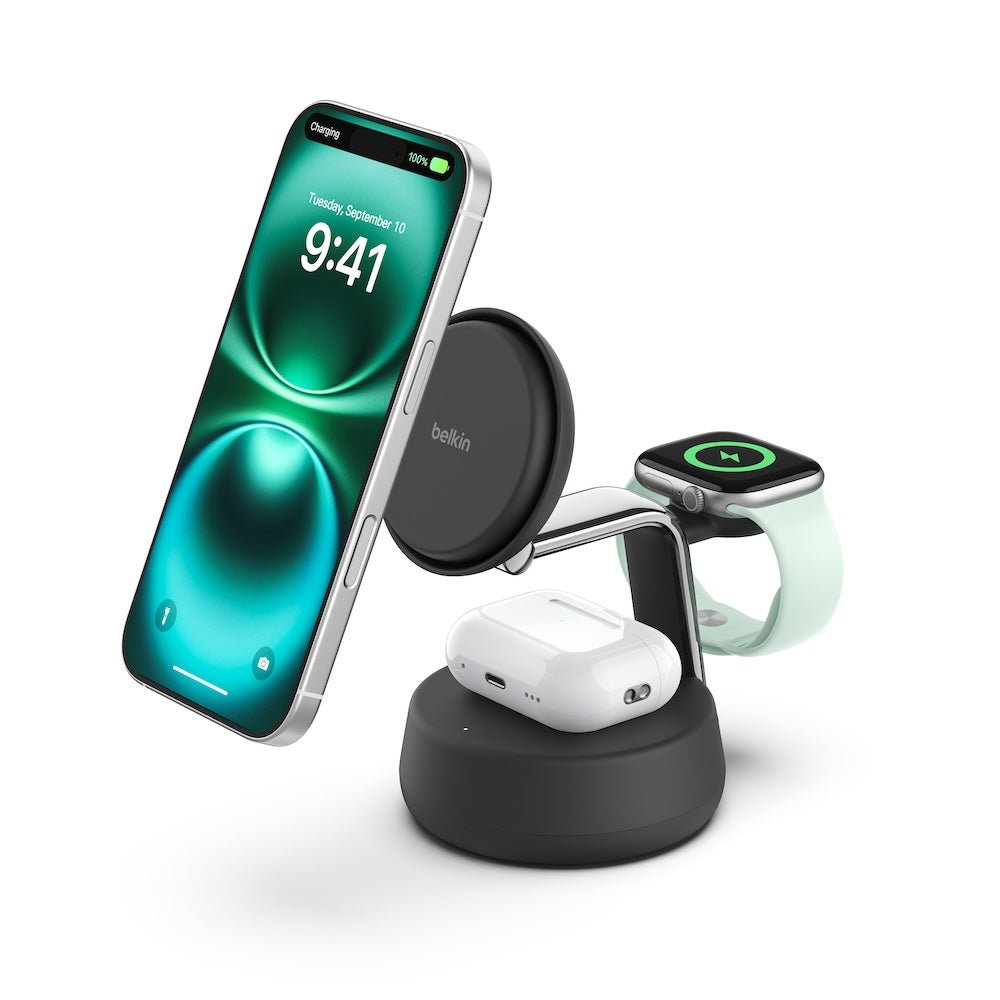
The Belkin WIZ040 makes the most sense if you charge an eligible phone, an Apple Watch, and wireless earbuds in the same spot. Its extra phone power matters most during short daytime charging sessions.
As an Amazon Associate, we earn from qualifying purchases. The Amazon link opens a search for the older WIZ023 model. The WIZ040 buttons below lead to exact product pages.
Should you buy the Belkin WIZ040?
Buy it if your phone supports the dock’s 25W mode and you want a permanent charging spot for an Apple Watch and earbuds. Keep your WIZ023 if you mostly charge overnight and your current stand already handles all three devices.
This Belkin WIZ040 review uses manufacturer specifications, support documents, and the U.S. retailer listing for the charcoal WIZ040ttCH. The assessment is based on the published specifications. We have no measured charging times, fan noise readings, or long-term reliability data for this dock.
Belkin WIZ040 vs WIZ023 at a glance
| Buying decision | WIZ040 UltraCharge Pro | WIZ023 BoostCharge Pro |
|---|---|---|
| Phone charging | Up to 25W on supported devices | Up to 15W on supported devices |
| Phone position | Tilting pad with a flat position | Adjustable magnetic stand |
| Cooling | ChillBoost active cooling with a fan switch | Standard stand design |
| Other devices | Apple Watch and compatible wireless earbuds case | Apple Watch and compatible wireless earbuds case |
| Best fit | Short daytime sessions and a compatible 25W phone | Overnight charging and phones that top out at 15W |
Read our Belkin WIZ023 review for a closer look at the 15W stand. Our Qi2 vs MagSafe guide explains how to read the certification and wattage labels across brands.
Will your phone actually charge at 25W?
Start with your exact phone model and its software version. The WIZ040 can provide up to 25W to eligible phones. Belkin says other compatible Qi2-certified devices charge at up to 15W. Belkin’s advertised iPhone 16 charging-time example used iOS 26 or later in its internal test. Treat that as a result for the specified setup. Battery level, temperature, phone use, and the case can all affect actual speed.
A magnetic case can help a compatible phone line up with the pad. Check the phone’s supported wireless charging rate separately. Also verify that the case seats flush, particularly if it has a thick camera lip, kickstand, grip, or wallet attachment.
What the numbers mean: 25W is the maximum rating for the phone pad on a supported device. The bundled 45W USB-C adapter powers the dock. The wireless earbuds position is rated up to 5W.
What the dock changes on a desk or nightstand
A better fit for short charging windows
If you drop your phone on the stand between calls or while getting ready to leave, the higher ceiling gives a supported phone more opportunity to charge during that window. If the phone spends the whole night on the dock, the added power is a weaker reason to pay extra. The stand’s tilt and device layout may matter more than the wattage in that routine.
The fan adds a choice
Belkin’s ChillBoost system uses a switchable fan to help dissipate heat. On a desk, you can use the fan for daytime top-ups. At a bedside, try the fan off if you prefer a quieter setup. Belkin’s cooling figures reflect its own test conditions, and actual results depend on the phone and environment.
Check all three charging positions
The watch pad is designed for compatible Apple Watch models. If you use a Galaxy Watch or Pixel Watch, plan on its own charger. On the base, confirm that the earbuds case supports wireless charging. For example, Apple sells AirPods 4 in two versions, and the case with Active Noise Cancellation supports wireless charging. Check your exact variant.
What to verify before ordering
- Match the model. Look for WIZ040ttCH for the charcoal U.S. version. Similar UltraCharge names cover several shapes and configurations.
- Check the phone’s rated speed. Confirm both model and software in Belkin’s compatibility details. If your phone caps at 15W, choose on layout and price.
- Confirm what comes in the box. The U.S. package lists a 45W USB-C adapter and a 5-foot USB-C cable. Verify both if you shop open box.
- Compare the delivered total. Look at shipping and return terms alongside the price, especially if you need to test case fit.
Who should stick with a 15W stand?
If you charge overnight, have a 15W phone, or already own a 3-in-1 dock that fits your devices, the WIZ023 remains a sensible choice. Check the price difference for the exact models. If you only charge a phone, a single magnetic pad or a USB-C cable can be the better buy.
Frequently asked questions
Does the Belkin WIZ040 come with a wall charger?
Yes. Belkin lists a 45W USB-C power adapter and a 5-foot USB-C cable in the U.S. box.
Can I turn off the ChillBoost fan?
Yes. The dock has a fan control, and Belkin explains how to use it in the WIZ040 support guide.
Can the WIZ040 charge three devices at once?
Yes. The three positions are for a compatible phone, Apple Watch, and wireless charging earbuds case. Each device has its own supported rate.
Is it worth upgrading from the WIZ023?
Upgrade if your phone can use the higher output and you regularly need short top-ups, or if you specifically want the WIZ040’s tilting pad and cooling control. For overnight charging with a 15W phone, keep the WIZ023.
Bottom line: The WIZ040 is a good fit for a compatible 25W phone and an Apple Watch setup that lives on a desk or nightstand. Compare the exact charcoal model at the two retailers below.
Sources: Belkin U.S. specifications, Belkin WIZ040 user guide, and the B&H model listing. Featured product photo via iStudio.


One Comment