

Anker Prime 250W Power Bank Review: Amazon vs Walmart
Anker Prime 27,650mAh 250W: a laptop power reserve
Compare the exact model, available offers and complete charging kit before you buy.
As an Amazon Associate I earn from qualifying purchases. We may also earn a commission through Walmart links, at no extra cost to you.
Anker Prime 250W review: the quick answer
The Anker Prime 27,650mAh 250W is worth considering if you need a substantial USB-C reserve for a laptop and carry more than one device. Its premium features make less sense if your daily problem is simply keeping a phone alive on a short commute. Choose around your laptop’s input needs, your carrying tolerance and the full purchase cost.
This is a specification-based buying review, not a hands-on test. We have not measured charging speed, sustained output, temperatures or usable energy. The advice below explains how to assess the model and compare store offers without turning manufacturer performance examples into our own results.
Amazon vs Walmart price comparison
Offer research date: October 17, 2026. The retrieved Walmart product page displayed $179.99, an Add to cart button and AnkerDirect as seller and shipper. That is a page observation, not a checkout guarantee. Amazon’s product listing was found, but a dependable current offer price was not available in the retrieved content. We therefore cannot identify a price winner.
The comparison below concerns the standalone 27,650mAh 250W model. Do not compare it with a package that includes a charging base or with another Prime generation simply because the product names look alike.
| Store | Price evidence | Decision |
|---|---|---|
| Amazon | Current price not verified | Open the exact listing and check seller, stock and checkout cost. |
| Walmart | $179.99 displayed in retrieved page | Add to cart shown; sold and shipped by AnkerDirect. Recheck for your location. |
| Cheapest store | Not established | Two verified available offers are needed for a fair price comparison. |
What the 250W number actually means
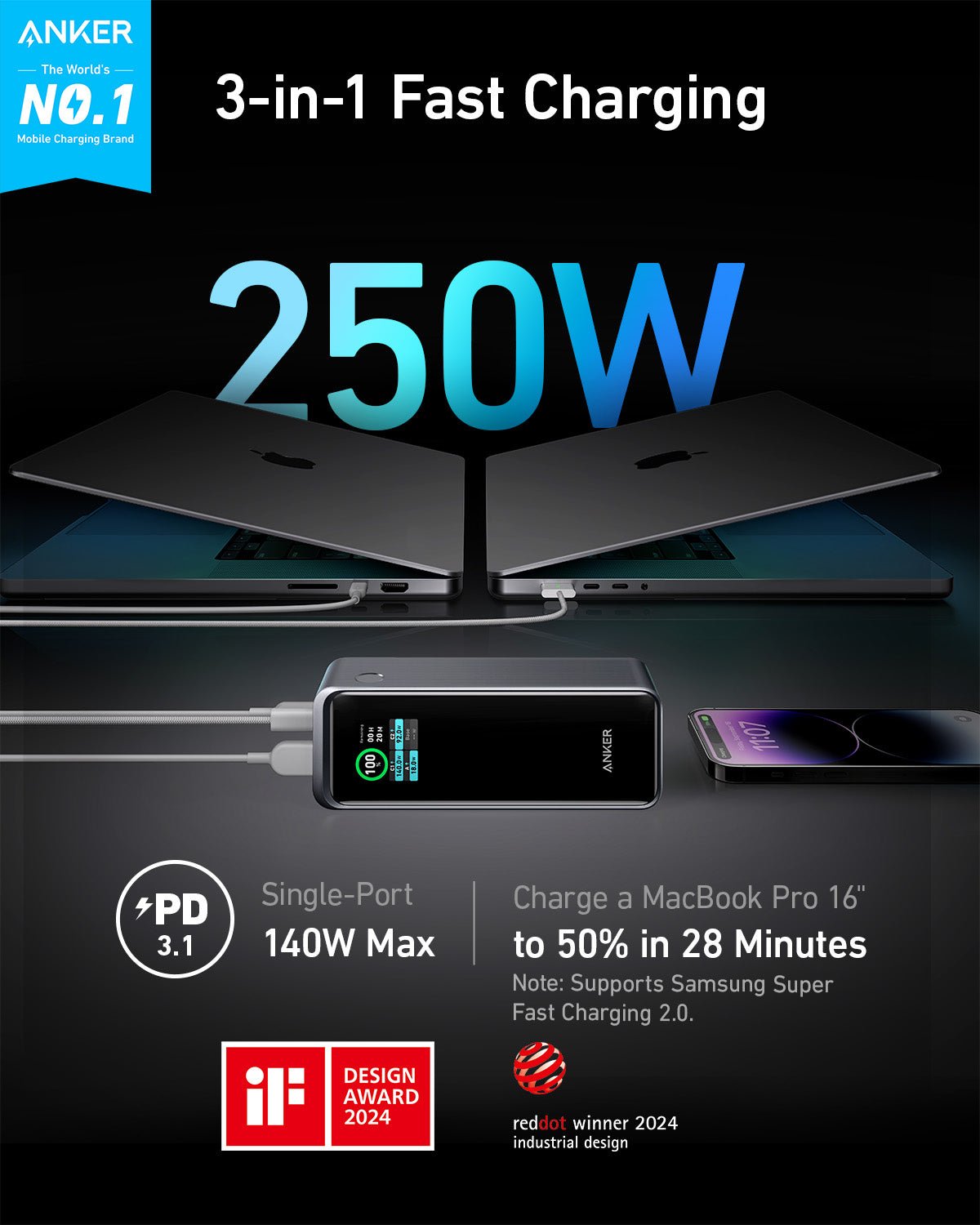
Anker identifies this model as A1340, with 27,650mAh capacity, two USB-C ports and one USB-A port. Its current US specification page lists 250W maximum total output and up to 140W on an individual USB-C port. Listed weight is 665g. These are manufacturer specifications, not measured results.
The total-output figure is a shared system limit. One connected laptop does not receive 250W through a single cable. It negotiates a supported power profile, and the actual transfer also depends on the cable and the computer. Likewise, adding the largest number listed for each socket does not establish a valid simultaneous charging combination.
Before buying for two laptops, find the power distribution chart in the manual for the exact unit. Check the row for your intended combination of occupied ports. If you need a specific minimum at each port, confirm that combination rather than relying on the largest figure in a retailer title.

Who should buy this power bank?
A mobile laptop user is the clearest candidate. If you spend several hours between outlets, a high-output pack can be useful during meetings, train travel or work in a shared space. First confirm that your computer accepts charging through USB-C. A USB-C connector used for data or video does not necessarily accept incoming power.
The second candidate is someone carrying a laptop, tablet and phone who wants one shared energy reserve. The convenience comes from carrying fewer separate batteries. The tradeoff is that every device draws from the same stored energy. A phone refill leaves less available for the computer later in the day.
Skip this category if your main use is light phone charging and you rarely carry a laptop. A smaller pack may fit your pocket and be easier to remember. Also reconsider it if you work beside an outlet most of the time. A suitable wall charger may solve your real problem more directly and avoid carrying a heavy battery unnecessarily.
Check your laptop before ordering
Start with the laptop manufacturer’s charging documentation and the label on its normal adapter. Record the expected wattage, supported charging input and any cable requirements. An adapter’s wattage is useful context, but it does not prove that the laptop accepts the same power through every USB-C port.
For a USB-C laptop, use the appropriate input port and a cable rated for the intended power. For a model that normally uses a proprietary connector, do not assume an inexpensive adapter cable makes this battery suitable. Compatibility includes supported voltage and current as well as connector shape.
Think about workload, too. A laptop can consume incoming energy while charging. Under a demanding task, its battery percentage may rise slowly or remain nearly steady even when the charging connection is working. For travel, estimate the reserve you need for your typical workload rather than expecting the same result during both document editing and intensive rendering.
Choose the right cable for high-power charging
Treat the cable as part of the purchase. A cable that physically fits can still limit the negotiated power. If your goal includes charging above 100W, check the cable’s explicit high-power rating and the laptop’s supported charging path. A suitable 240W USB-C cable can provide rating headroom, but it cannot make a device accept a profile it does not support.
For MacBook users, verify whether the intended charging speed uses USB-C directly or a compatible USB-C to MagSafe cable. Different models and ports can behave differently. Avoid treating “works with MacBook” as a promise of the highest possible charging rate on every MacBook.
Inspect the package contents before adding cables to the cart. A bundled lead may be enough for one device, while a second device requires another suitable lead. Choose practical lengths: enough reach for a seat or desk, without leaving excessive cable hanging from the laptop connector. Replace a lead that is frayed, loose or visibly damaged.
Capacity: what to expect from 27,650mAh
Capacity and power answer different questions. Power describes how quickly energy can move under supported conditions. Capacity describes the size of the stored reserve. A larger wattage number does not automatically produce longer runtime, and a larger milliamp-hour number does not guarantee faster charging.
Use watt-hours when comparing a power bank with a laptop battery. Milliamp-hours depend on the voltage at which they are quoted. You cannot directly divide a power bank’s advertised mAh by a laptop battery’s mAh when their reference voltages differ and call that a reliable full-charge count.
For illustration only, imagine a reserve rated at 90Wh and a laptop battery rated at 60Wh. The ideal energy ratio would be 1.5 before losses. It would not prove 1.5 real full charges. Conversion losses, battery management and running the computer consume energy. We have not measured this Anker’s usable capacity, so we do not promise a specific full-charge count.
A more useful purchasing question is whether a substantial top-up meets your schedule. If you need another hour of light work before reaching an outlet, that is a different target from restoring an empty workstation battery while running heavy software. Plan around the task you need to finish.
Charging several devices: set priorities
Decide which device matters most before connecting everything. On a work trip, keeping the laptop available may be more valuable than fully refilling a second phone. During a family journey, modest phone top-ups may be the priority instead. A multi-port pack offers flexibility, but it does not create extra stored energy.
Check the display after adding another device and look for the charging indicator on each connected product. Port allocation may change when the connection pattern changes. If a laptop falls below the power it needs for your workload, disconnect optional devices and compare the behavior with the laptop alone.
Do not interpret a brief renegotiation or a changing wattage display as a complete battery-health diagnosis. Charging power changes as devices warm up or approach full charge. If something repeatedly stops charging, simplify the setup and check cables, ports and the official instructions before deciding that the pack is defective.
Recharging the power bank and the optional base
A powerful output rating does not tell you how fast the battery refills. Input power has its own limits. Check the current manual for the supported recharge arrangement, the charger required and whether the quoted time assumes one connection or more. We do not promise a recharge duration because we have not tested it.
This distinction matters here: the retrieved retailer description promotes a 170W recharge arrangement, while Anker’s current US page describes a 140W recharge route. Rather than combining those claims, verify the supplied unit’s manual and the exact setup before paying for additional charging equipment.
The standalone Walmart listing says the charging base is not included. A base bundle is a separate buying comparison. Add the base only if its convenience fits how you work; it is easy to spend more on accessories than the original store-price difference. Confirm base compatibility with A1340, since products carrying the Prime name are not automatically interchangeable.
If you already own a suitable USB-C charger, start by checking whether it covers your refill needs. Overnight access to an outlet may make an expensive fastest-possible setup unnecessary. Frequent short stops between journeys may justify a different decision. Choose for your routine rather than a headline recharge time.
How to compare the final Amazon and Walmart cost
Open both product pages and verify the selected capacity, model, condition and bundle. Then enter your delivery location. A shipping promise shown for another ZIP code is not your delivery promise. Avoid making a decision from a search result that may show an older price or a different option.
Compare item price plus mandatory shipping and applicable tax, minus only discounts that actually apply at checkout. A targeted coupon, membership benefit or payment-card promotion is not a universal discount. If you cannot apply it to your own order, exclude it from your comparison.
Read the seller and fulfillment lines separately. A marketplace website can host offers from several sellers. Keep a record of the seller you selected and the return terms attached to that offer. If the cheaper listing has unclear condition or support, resolve those questions before treating the price as better value.
For a bundle, write down what you would otherwise buy separately. A charging base has little financial value to you if you would never use it. Conversely, a genuinely useful accessory can make a slightly higher package price reasonable. Compare the cost of the kit you need, not simply the smallest number visible on either screen.
Other options already covered on MultiChargers
If you want to understand the alternatives before choosing, read our Anker Prime 200W buying review, Anker 737 review and UGREEN 145W review. Compare the documented single-port behavior, carrying size and available packages rather than ranking them solely by total watts.
For a laptop-specific starting point, our power banks for MacBook Air guide can help narrow the category. Our laptop power bank wattage guide explains how to match output to the computer. If a cable is the missing part, see the USB-C laptop charging cable guide before checking out.
Practical ownership checks
When the order arrives, match the label and package contents against the listing you bought. Keep the receipt and packaging while you confirm that the pack works with your actual devices. Start with one device and a known suitable cable, then add the rest of your normal setup.
Use the product according to its supplied instructions. Keep it accessible during charging and avoid trapping it in bedding or a tightly packed compartment. Stop using a pack that is swollen, leaking, physically damaged or behaving unusually, and contact the manufacturer for guidance. Do not try to repair the battery cells yourself.
For air travel, check the watt-hour marking on the physical unit and your airline’s current rules before departure. Carrying, storing and using batteries onboard can be governed by different requirements. A retailer’s broad travel claim is not a substitute for the airline’s rules for your itinerary.
Frequently asked questions
Can one laptop receive 250W?
No. The 250W headline is the total-output maximum. Anker lists up to 140W for an individual USB-C port; the device and cable must support the negotiated profile.
Is Amazon cheaper than Walmart?
We cannot establish that. Walmart displayed $179.99 in the retrieved listing, but we did not verify a dependable current Amazon offer. Compare both checkout totals before buying.
Is the charging base included?
The standalone Walmart listing used here excludes the base. Read the selected package contents on both stores because bundles differ.
Is this a hands-on review?
No. This is a specification and purchase analysis. We have not measured charging performance or usable capacity.
Final buying decision
Shortlist A1340 when your laptop accepts compatible USB-C charging and you need a substantial shared reserve. Confirm the cable, intended port combination and total kit cost first. Walmart provides a visible reference offer in this comparison; Amazon needs a fresh offer check. Choose the available package with the best verified delivered cost and support for your needs.
This review separates manufacturer ratings from measured results and checks retailer offers for model and package differences.
Sources and offer notes
Anker US A1340 specifications; Amazon product listing; Walmart standalone product listing. Retrieved pages may be cached. Prices, availability, sellers and delivery terms can change. The checkout page controls the final offer.



3 Comments