

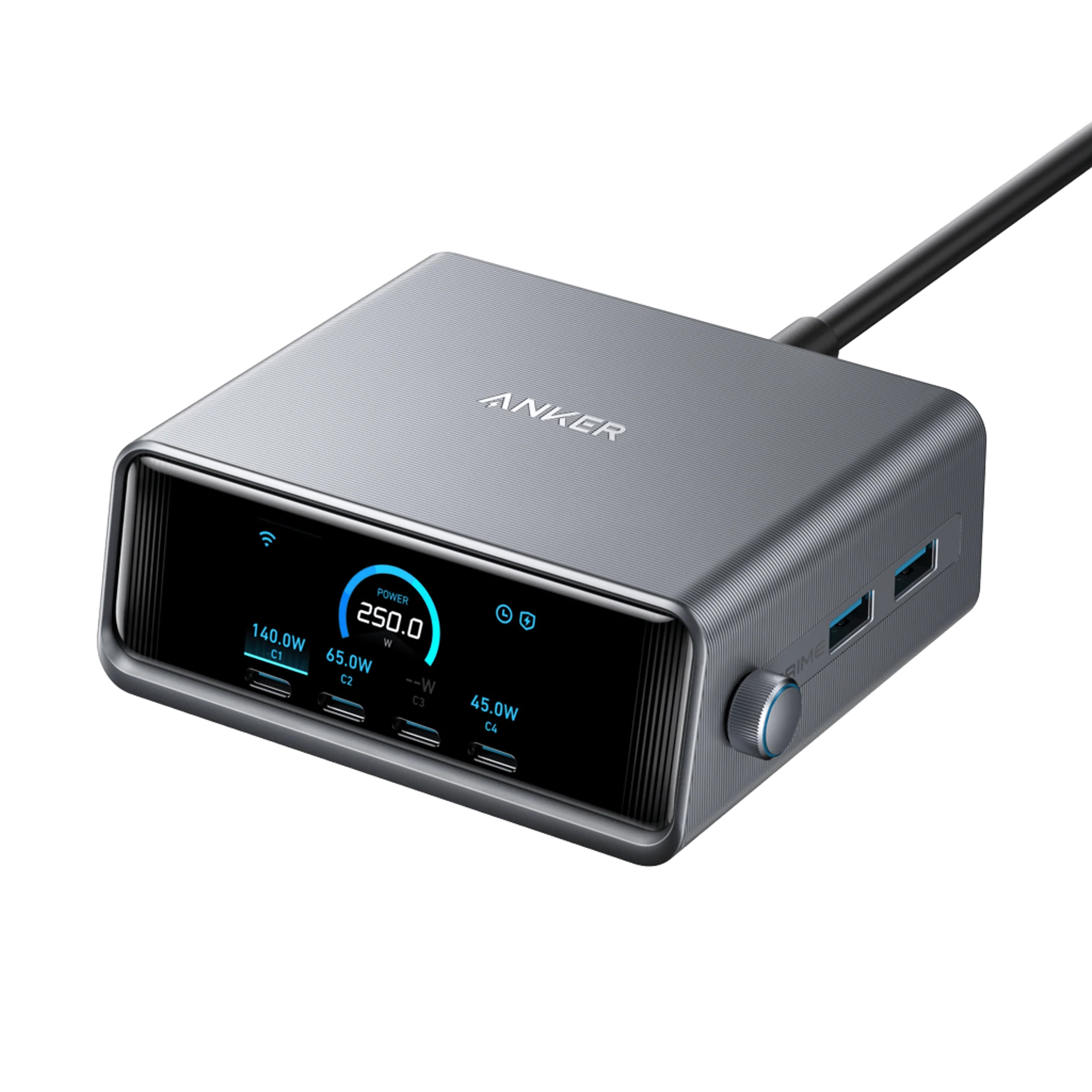
Anker Prime 250W Charger Review: Is the A2345 Worth It?
This Anker Prime 250W charger review covers the A2345 six-port desktop station. Its screen and control dial make it an interesting upgrade for a desk where several devices compete for charging power. Buy it because those controls solve a daily problem, rather than because 250W sounds impressive.
Affiliate disclosure: As an Amazon Associate I earn from qualifying purchases. We may also earn a commission through Walmart links, at no extra cost to you. Retailer buttons open searches for the specified model; current retailer prices and stock are not independently verified.
PREMIUM DESKTOP CHARGING · ANKER A2345
See where your desk’s charging power goes.
A six-port charging station with a display and control dial. Check whether its extra control is worth the premium for your setup.
AMAZON MODEL CHECK
Find the A2345 charger
Match the six-port desktop station with a screen and dial. Exclude Anker Prime power banks and other wattage versions.
WALMART OFFER CHECK
Compare seller and bundle
Check condition, regional AC lead, included cables, return terms and the total due at checkout.
Anker Prime 250W charger review: the quick verdict
Shortlist it for a busy, permanent desk where you want visibility and control over charging. A laptop, tablet, phone and accessories can be easier to manage from one station. The screen also gives you something more useful to inspect than a row of anonymous charging sockets.
The premium makes less sense when you connect one laptop and leave it alone. In that situation, a simpler charger may do the job just as well for your needs. A display does not add charging support to a device or make a full battery accept more power.
Review method: We checked Anker’s product page and support documentation on October 28, 2026. This is a specification-based buying review. We have not tested charging speed, sustained output, temperature, efficiency or long-term reliability. Recommendations reflect expected fit, not measured performance.
The A2345 specifications at a glance
| Specification | Published limit or feature |
|---|---|
| Model | Anker Prime Charger A2345 |
| Maximum combined output | 250W |
| Connections | Four USB-C and two USB-A ports |
| USB-C1, individually | Up to 140W |
| USB-C2 / C3 / C4, individually | Up to 100W each |
| USB-A1 / A2, individually | Up to 22.5W each |
| Two ports in use | Up to 240W combined |
| Three to six ports in use | Up to 250W combined |
| Controls | 2.26-inch LCD and control dial |
Sources: Anker A2345 support specifications and official product page. These are manufacturer ratings. Individual maxima are not simultaneous guarantees.
Screen and dial: useful control or an expensive extra?
The main reason to consider this model is the interface. If your laptop charges slowly while several other devices are attached, visible power information can help you decide what to inspect next. It is more convenient than guessing which cable belongs to which port behind the desk.
That does not turn the screen into a laboratory instrument. A displayed charging figure is only one part of the picture. Battery level, workload and the device’s own charging behavior can change the result, even when the charger and cable are working as intended.
Ask a practical question before paying more: will you actually use the controls? Someone who frequently changes between a work laptop, a tablet and a handheld device may value them. Someone who wants a hidden power supply behind a monitor may barely look at the display after setup.
Power sharing: plan the busiest charging session
The output ratings describe a shared budget. Four USB-C ports rated individually at high wattages do not create four independent high-power chargers. Start with the device that matters most during work, then account for the other devices you usually connect at the same time.
Anker documents automatic allocation through its default AI Power Mode, plus a Port Priority Mode. Treat those as ways to manage a finite supply. Selecting a priority cannot make a device accept more than its supported input or create additional power beyond the station’s limit.
For planning, imagine a work session with a demanding laptop, a tablet on a video call and a phone topping up. Check the laptop’s supported charging input first. Decide whether maintaining laptop performance matters more than charging every small device as quickly as possible.
Anker notes that distribution can vary with firmware. Use the guide for your unit and its current settings rather than treating a promotional diagram as a fixed allocation for every future combination. Our explanation of multi-port charger power sharing covers the underlying tradeoff.
Laptop and cable compatibility checks
Confirm that your exact laptop supports charging through the USB-C socket you intend to use. Some laptops have USB-C connectors for data or displays without accepting charging there. Others support USB-C charging but still need their original adapter for demanding workloads.
For a compatible 140W charging connection, use the correct high-power port and an appropriate EPR cable. A properly specified 240W USB-C cable is one option. Above 60W, check for a suitable 5A e-marked cable instead of relying on appearance, connector shape or data-speed branding.
MacBook owners should verify their model’s supported charging route and cable requirements. Do not assume that every MacBook uses the same connection for its fastest mode. Our laptop charging cable guide explains which cable details to compare.
Phone charging also depends on protocol support. If a particular Samsung fast-charge mode is essential, verify its requirements against the exact port and cable. A large shared wattage figure alone does not establish phone-specific compatibility.
A desktop station is different from a power bank or dock
Anker uses the Prime name across several product families. The A2345 is a mains-powered charger. It needs a wall outlet and does not store energy for use during a commute or a power outage. The similarly named 250W power bank is a different purchase.
It is also a charging station rather than a data dock. Do not buy it expecting display output, an Ethernet connection or storage transfer between connected devices. Keep your charging decision separate from the ports you need for monitors and peripherals.
This distinction matters when browsing retailer searches. Confirm the model number and photographs before reading a headline price. A cheaper Prime product can be a power bank, a different charger, a refurbished unit or a bundle with different contents.
Pros, limitations and the complete desk cost
Why it can be worth it: the combination of multiple charging connections, visible power information and allocation controls can suit someone who actively manages a busy desk. Two USB-A connections may also help if you still use older accessory cables.
What to weigh: the controls add a learning step, the shared budget still has limits, and a central station becomes a single dependency for several devices. Keep another suitable adapter available if uninterrupted charging is important to your work.
Include the cables you need in the purchase budget. Check what the exact listing includes rather than assuming product photographs show the full package. You may already own suitable cables; replacing every cable just to match a new charger can add unnecessary cost.
Choose a location with enough space for the station, its AC lead and the cable bends. Follow the placement instructions and keep the unit accessible enough to use the dial. A screen offers little value if the charger ends up buried behind other equipment.
Amazon vs Walmart: buy the correct version
Use the searches below to locate Anker Prime Charger A2345, 250W, six ports. The seller’s exact listing should show four USB-C ports, two USB-A ports, a display and a control dial. Compare the same condition and package at both stores.
Read the seller details, delivery charge, return window and warranty eligibility. Check the regional mains lead and any included USB-C cable. A marketplace result should be assessed on its own terms, rather than assuming every listing has the retailer’s direct-sale conditions.
We have not verified matching live Amazon and Walmart checkout prices or inventory. Compare the final total yourself and avoid treating a search result, coupon badge or crossed-out price as a confirmed saving.
Compare with other premium desktop options
If the display and dial are not important to you, compare the port mix and power-sharing behavior of other stations. Our UGREEN Nexode 300W review covers a five-port alternative. Our Satechi 200W review considers a six-USB-C setup.
Do not rank these solely by total wattage. Count USB-C and USB-A connections, identify your most demanding laptop and check the intended combination of devices. The best fit is the one that meets the daily workload with the least unnecessary complexity.
For a wider starting point, see our desktop USB-C charger buying guide. A smaller station can be the better choice when you need fewer connections.
Frequently asked questions
Can the Anker Prime A2345 send 250W to one laptop?
No. C1 is rated up to 140W individually. The 250W figure describes the station’s maximum combined output.
Is this the Anker Prime 250W power bank?
No. The A2345 is a six-port desktop charger powered from an AC outlet. Anker’s Prime power bank is a separate device.
Will connecting six devices guarantee full speed on each?
No. Each connection must fit the shared power budget, supported allocation and device requirements. A device may also reduce its demand as its battery fills.
Does the screen prove that a cable is faulty?
No. A low displayed figure can have several causes. Check battery level, device workload, port settings and a known suitable cable before drawing that conclusion.
Which store has the lower price?
No matching live retailer price comparison is verified here. Compare the exact model, seller, package and checkout total at both stores.
Our buying recommendation
The Anker Prime 250W A2345 is a sensible premium shortlist item when you will use its display and power controls to manage several devices at a fixed desk. It is harder to justify when a simpler adapter already meets your charging needs.
Before ordering, map your devices to the available ports, confirm the charging cables and compare complete offers. Choose the extra controls because they make your routine easier, not because a screen or headline wattage promises a result your devices cannot use.

2 Comments