Anker 735 Nano II Review: Amazon vs Walmart
THREE-PORT CHARGER • A2667 BUYING GUIDE
Anker 735 Nano II: choose the port combination before the deal
One compact adapter can charge a laptop and phone together, but the laptop’s power allowance changes when you use the other sockets.
Affiliate disclosure: As an Amazon Associate I earn from qualifying purchases. We may also earn a commission from Walmart affiliate links at no additional cost to you.
This Anker 735 Nano II review compares Amazon and Walmart offers for model A2667 and explains the power-sharing limits that determine its usefulness. It is a specification-based buying analysis, not a hands-on test. We have not measured charging speed, sustained output, temperature or efficiency.
Amazon vs Walmart price comparison
Historical offer snapshot — October 18, 2026. Prices below were recorded on that date and were not reverified during the October 23 content update. Use the store buttons to see current offers.
During that earlier check, Walmart’s live page displayed $29.99 with Nano II 65W selected, an Add to cart button, and AnkerDirect as seller and shipper. Amazon’s accessible listing did not provide a verified featured-offer price. The comparison therefore has one confirmed displayed price and no supported cheapest-store winner.
| Store | Observed price | What was verified |
|---|---|---|
| Amazon | Not verified | The retrieved listing identifies A2667; no reliable current featured-offer amount was available. |
| Walmart | $29.99 | Nano II 65W selected; Add to cart shown; sold and shipped by AnkerDirect. |
| Price winner | Undetermined | Compare two available offers for the same version, condition and package. |
These observations are a dated snapshot, not an automatically updating price feed. Taxes, stock, delivery and seller selection may change. Confirm the amount in the buying box and the final checkout total. A promotion from an earlier deal article is not evidence that the same discount remains available now.
The Walmart page includes a separate GaNPrime 65W option. That is not the Nano II edition reviewed here. If you change the edition, compare its own model number, output behavior and price. A similar name does not make the two products interchangeable for a detailed buying comparison.
Anker 735 Nano II review: the essential specifications
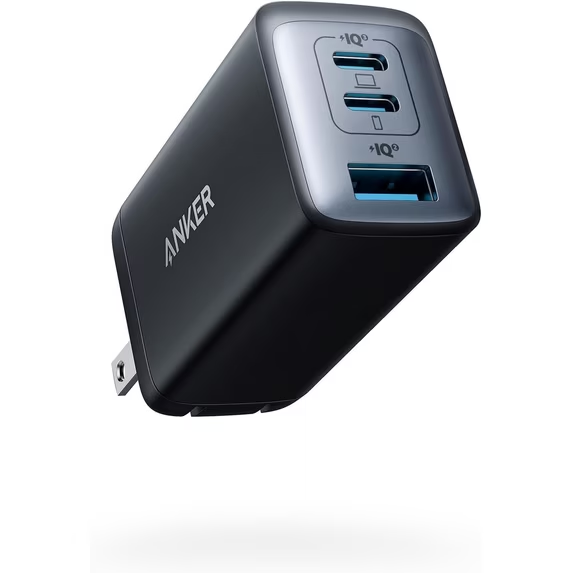
Anker’s A2667 support page lists three outputs: two USB-C and one USB-A, with up to 65W from either USB-C when used alone and up to 22.5W from USB-A alone. The same official source documents different limits for combined use, reproduced below. These are manufacturer maximum ratings, not independent measurements.
Power sharing: the table that decides the purchase
| Connections | USB-C1 maximum | USB-C2 maximum | USB-A maximum |
|---|---|---|---|
| C1 alone | 65W | — | — |
| C2 alone | — | 65W | — |
| A alone | — | — | 22.5W |
| C1 + C2 | 45W | 20W | — |
| C1 + A | 40W | — | 22.5W |
| C2 + A | — | 12W | 12W |
| All three | 40W | 12W | 12W |
Source: Anker’s A2667 specifications and support page. Each value is a stated maximum for that connection pattern. Actual power depends on the receiving device, cable and negotiated profile. Unused headroom should not be assumed to transfer freely to another socket.
The important buying implication is port priority. A laptop belongs on C1 when you intend to use another output. C2 and USB-A together form a much lower-power combination; it is unsuitable to assume that a laptop on C2 keeps the same allowance after a USB-A accessory is connected.
Think of the table as a routing guide for your devices. A large number on the front of an adapter summarizes its capability under specific conditions. It does not describe every possible cable arrangement. Choose the row that matches your real daily setup and compare that row with each device’s requirements.
Before you buy: match the charger to your routine
- Laptop plus phone: check whether a 45W laptop allowance and a 20W phone allowance suit both devices.
- Three devices: expect the reduced allocations in the table; prioritize the laptop on C1.
- Samsung charging: do not assume a 65W adapter provides every Samsung phone’s fastest mode.
- Retailer offer: confirm A2667, U.S. plug, seller, condition, included cables and the final delivered total.
Laptop and phone together: a realistic use case
Consider a hypothetical laptop that accepts USB-C Power Delivery and operates comfortably from 45W during your usual work. With that laptop on C1 and a compatible phone on C2, the documented allocation is a plausible fit. It remains a compatibility example, not a promise of a particular charging speed for every laptop or phone.
Now consider a laptop that needs its full 65W input to charge at the desired pace during heavy work. Adding the phone reduces the laptop allowance. The computer could charge more slowly or use its internal battery to cover part of the workload. The extra socket is convenient, but it does not create additional power beyond the adapter’s budget.
Do not judge this situation solely by whether a charging symbol appears. Compare the laptop battery percentage before and after a representative work session. A battery that stays level may still indicate the adapter is supporting the workload, while a falling percentage indicates the total demand exceeds what is reaching the computer. The manufacturer’s guidance remains the starting point.
If you regularly need a higher-power laptop feed and a fast phone charge simultaneously, compare a charger with a stronger documented two-port allocation. Our laptop-and-phone charger guide focuses on that need. Spending more only helps when the alternative’s relevant port combination is actually better for your equipment.
Three connected devices: convenience with lower allowances
The third socket can be useful for a device that does not need much power, but filling every port is not automatically the best way to charge your kit. Start by deciding which device has the strictest deadline. If the laptop must recover quickly before leaving, charging it alone first may be more useful than connecting everything immediately.
For an overnight routine, lower shared allowances may be acceptable if the devices support them and have enough time. For a short break between meetings, those same limits may be frustrating. The number of sockets should follow the charging schedule, not replace it as the main purchasing criterion.
Small accessories also deserve a compatibility check. A USB-A connection may work well for one cable and accessory combination while a different device needs another arrangement. Follow the accessory’s own charging instructions and the adapter’s support notes. Do not assume that every watch or earbud case has identical low-power behavior.
Make sure you are buying Nano II, not another 735
Anker uses the 735 name on more than one product. This review concerns Nano II model A2667. The GaNPrime edition is a different model and should be evaluated using its own documentation. Look at the selected variant, product details and label rather than relying only on the large title at the top of a marketplace page.
The issue matters when prices appear far apart. A search tile may show the lowest available option within a group, while the page opens a different edition. A bundle may include a cable or multiple adapters. Compare the number of chargers, port layout, regional plug and condition before concluding that one store offers a large saving.
Save the order description once you have selected the right package. When the unit arrives, check that the model and ports match. If the package differs from what you ordered, resolve the mismatch while the return process is straightforward rather than trying to apply the wrong product’s output table.
Cables and laptop compatibility
Confirm that your laptop accepts charging through the USB-C port you intend to use. Connector shape alone does not establish a power input. The supported charging profiles and the laptop maker’s recommended adapter power determine whether this charger is suitable as a primary supply, a travel spare or neither.
For the full single-port 65W capability, choose a suitably rated USB-C cable. A 60W cable can become a limit even though it charges a phone successfully. A properly specified 5A electronically marked charging cable is the appropriate category when pursuing a profile above 3A. Read the cable’s power specification rather than guessing from its material or thickness.
A cable suitable for charging does not automatically offer high-speed data or a monitor connection. If the same lead also serves a dock, check data and display support independently. Our e-marked cable explanation and charging-versus-data cable guide address those separate shopping questions.
Do not buy a powerful adapter solely to improve a phone that has a lower input limit. The phone draws a compatible negotiated amount; a 65W maximum does not force that wattage into it. Likewise, fast charging standards are not interchangeable. Verify the exact phone’s protocol requirements before expecting its highest advertised charging mode.
Samsung Galaxy and Apple Watch: check these limits
Anker’s U.S. A2667 product documentation specifically excludes 45W Super Fast Charging 2.0 for the Galaxy S22 Ultra. Do not use the charger’s 65W headline as evidence of that phone’s fastest charging mode. Match your exact Galaxy model to the required PPS profiles before purchasing.
For Apple Watch charging, Anker recommends a USB-C port. Its guidance also calls for removing the cable from the second USB-C port when charging a watch through USB-A. Plan the connection layout around that restriction if your watch is part of a nightly charging routine.
Three buying choices for different routines
Choose Nano II for a modest laptop-and-phone load
Consider A2667 if its two-USB-C allocation matches your daily devices and the complete kit price is attractive. Label the laptop cable for C1 if that makes your routine easier. The benefit is reducing the number of adapters while keeping the limits predictable.
Choose one port when simultaneous charging is unnecessary
If you charge one device at a time, compare the Anker 715 review. Additional sockets provide little benefit when they remain unused. Compare the current delivered price and physical convenience instead of assuming the three-port design must suit everyone better.
Choose a larger documented power budget for demanding work
If your laptop needs more power while a phone is charging, compare the relevant output rows of stronger adapters. Our desktop charger guide covers another form factor. A higher total alone does not answer how much reaches the laptop.
How to compare Amazon and Walmart fairly
Begin with the same item: A2667, matching condition, matching plug and matching package. Then compare the delivered total for your own address. Include mandatory shipping and tax, and only subtract a coupon that applies to your account and the selected variant. A subscription or membership benefit should not be treated as a universal price.
Next, inspect the seller and shipper. A brand’s name in the product title does not identify the merchant handling the order. Walmart’s observed offer showed AnkerDirect for both roles, but marketplace offers can change. Amazon’s seller list requires its own check before ordering. We did not purchase either offer or test delivery and returns.
Finally, match the purchase to the charging problem you are trying to solve. A lower price does not compensate for a port combination that cannot support your laptop-and-phone routine. Conversely, a newer or more expensive model may add little value if the Nano II allocation already covers the job. Establish the requirement first and compare offers second.
Frequently asked questions
Does each USB-C port supply 65W at the same time?
No. The 65W single-port maximum does not remain available on both USB-C sockets simultaneously. Anker documents 45W plus 20W when both USB-C outputs are used.
Which port should a laptop use with other devices connected?
Use C1 and compare its allowance in the relevant combination with your laptop’s input requirements. C2 plus USB-A is a lower-power pairing.
Is Walmart cheaper than Amazon?
Walmart displayed $29.99 in the October 18 historical snapshot, but a comparable Amazon price was not verified. Neither store’s price was reverified in the October 23 content update. There is no supported two-store price winner.
Is Nano II the same as the GaNPrime 735?
No. This article covers A2667 Nano II. Check the model number and the documentation for the exact edition on sale.
Did MultiChargers test this charger?
No. This review analyzes manufacturer documentation and retailer offer information. Charging speed, temperature and sustained output were not independently measured.
Our verdict
The Anker 735 Nano II is worth evaluating when you want a single adapter for several devices and its shared output fits your workload. Its most useful feature is the documented allocation, and its key limitation is the reduced laptop allowance with additional connections. Match the relevant table row to your equipment before buying.
The $29.99 Walmart figure is a historical October 18 reference. Check both retailers for current offers; this article does not establish a current lowest-price winner. Confirm the A2667 edition, final total and seller, then choose the offer that meets your requirements.