

Anker 715 Charger Review: Amazon vs Walmart
SINGLE-PORT USB-C CHARGER • BUYING GUIDE
Anker 715 Nano II 65W: one port, a simpler travel kit
Compare the correct A2663 charger at Amazon and Walmart, then decide whether one USB-C output fits your laptop, phone and daily routine.
Affiliate disclosure: As an Amazon Associate I earn from qualifying purchases. We may also earn a commission through Walmart affiliate links at no extra cost to you.
A compact charger should make your bag easier to use, not create a new compatibility puzzle. The Nano II 65W is a single-port option, so its main appeal is straightforward: connect one device without dividing an advertised total between several sockets. That simplicity still requires the right laptop input, cable and charging profile.
Amazon vs Walmart price comparison
Offer check: October 18, 2026, approximately 00:15 UTC. The live Walmart page displayed $29.99 with an Add to cart button and AnkerDirect as seller and shipper. The accessible Amazon page reported no featured offers, so an Amazon price could not be verified. This is an observed snapshot, not a live price feed. Recheck price, stock and delivery at checkout.
| Store | Observed price | Offer evidence |
|---|---|---|
| Amazon | Not verified | No featured offer in the accessible page; inspect other sellers and current conditions. |
| Walmart | $29.99 | Add to cart shown; sold and shipped by AnkerDirect in the observed session. |
| Lowest-price verdict | Undetermined | Two comparable available prices are needed to declare a winner. |
Walmart provides a concrete reference for evaluating this charger today, but a visible price is not a guarantee for every address or later visit. Taxes and delivery options can change the final total. Amazon may show other offers after a shopper selects a delivery location or opens the seller list; the missing featured offer does not establish that every Amazon seller is out of stock.
Compare a new A2663 charger with another new A2663 charger. A refurbished item, a cable bundle or a different Nano model can appear close to the same search result. If one store includes an accessory you need, calculate the complete kit price. If you already own the right cable, an unwanted bundle should not decide the purchase.
Anker 715 Charger review: specifications that matter
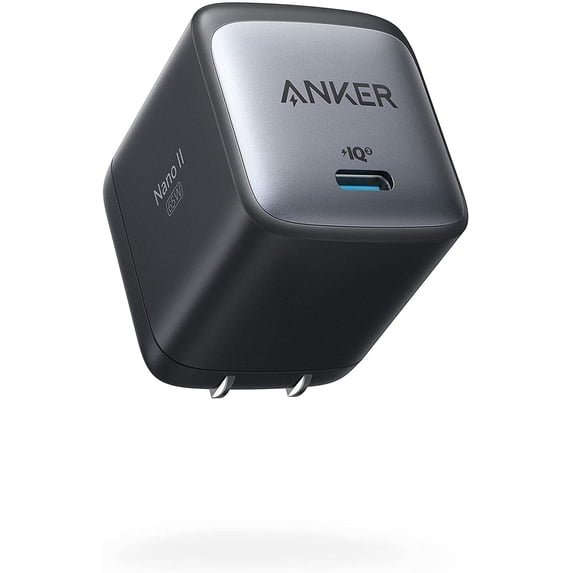
Anker identifies the Nano II 65W as model A2663 with one USB-C port and a maximum 65W output. Its published fixed output profiles include 5V/3A, 9V/3A, 15V/3A and 20V/3.25A. The US page lists 100–240V AC input, dimensions of 1.65 × 1.42 × 1.74 inches and a weight of 3.96 ounces. These are manufacturer specifications, not our measurements.
Source: Anker 715 official US specifications. We have not independently measured efficiency, surface temperature, sustained output or long-term reliability. There is no laboratory score or guaranteed full-charge time in this review.
Why a single port can be an advantage
For someone who charges a laptop alone during the day and a phone later, a single socket can be enough. There is no need to remember which combination of ports reduces the laptop allocation. You connect the device you need and let it negotiate a compatible profile. The tradeoff is scheduling: the second device must wait or use another power source.
This differs from a multi-port charger whose total power is shared. A 65W total on a three-port product does not necessarily mean 65W remains available to its laptop socket while two phones are connected. The 715 avoids that particular split because it has only one output. It does not avoid limits imposed by the cable, device or charging protocol.
Think about your actual charging overlap before choosing. If your laptop and phone both reach low battery at the same time each evening, one port can become inconvenient every day. If the phone usually lasts until bedtime and the laptop charges at work, a smaller single-port kit may suit you better than a larger adapter with sockets you rarely use.
Is 65W enough for your laptop?
Check the laptop manufacturer’s charging instructions first. The computer must accept power through the USB-C connection you intend to use. A USB-C-shaped port can serve different functions, and the presence of the connector alone does not establish a charging input. Match the supported charging voltage and wattage, not just the shape.
Look at the power adapter supplied with the laptop and the manufacturer’s minimum or recommended USB-C input. A machine designed around a higher-power adapter may charge more slowly with a smaller source, particularly while working. Some systems may show a low-power warning or restrict performance. The correct answer depends on the exact laptop, not on a generic claim that all USB-C laptops behave alike.
For a laptop that accepts an appropriate USB-C PD input within this charger’s capabilities, the 715 is a candidate for a compact replacement or spare. For a workstation or gaming notebook with demanding power requirements, treat it as a compatibility question rather than assuming the wattage will cover everything. Retain the original adapter until the replacement has been verified in your workload.
A practical evaluation should include charging while the laptop is idle and while doing your normal work. Note whether the battery percentage rises, remains steady or falls during sustained use. Those observations are more useful than judging solely by the charging icon. Our 65W vs 100W charger guide explains the decision at a broader level.
The cable can limit the result
A cable is part of the power path, not an incidental accessory. The published 20V/3.25A maximum exceeds the 3A rating associated with a 60W cable at 20V. To pursue the charger’s full 65W profile, use a suitable 5A electronically marked USB-C cable. A correctly specified 100W or 240W charging cable can be a practical choice; verify its actual rating rather than relying on thickness or braided fabric.
If you already own a 60W cable, the difference between its limit and the adapter’s maximum may not matter for a lower-power device. It can still be inappropriate to advertise that combination as a full 65W setup. Decide whether you need the final few watts before buying another lead, and keep the device’s own input limit in mind.
Charging capability does not establish data speed. A cable chosen for power may not be appropriate for fast external storage or a USB-C display. If you want one lead to handle a dock and charging, inspect those specifications separately. See our e-marked USB-C cable guide and laptop cable buying guide for the relevant shopping checks.
Phone and tablet charging expectations
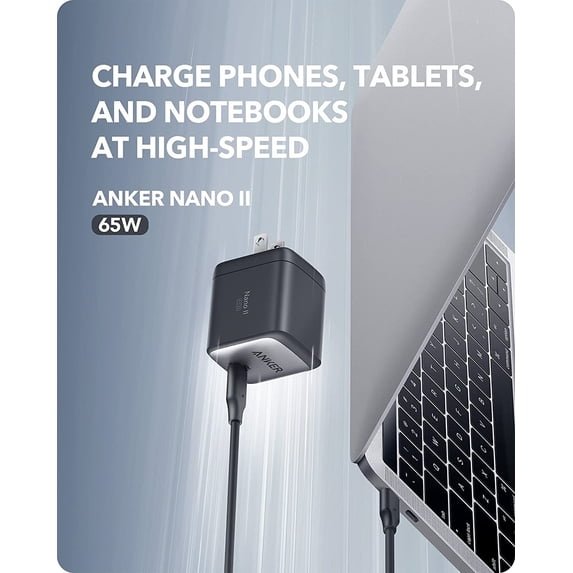
A 65W adapter does not force 65W into a phone. Compatible USB-C charging systems negotiate power, and the receiving device sets its own requirements. A phone with a lower charging ceiling will not become a 65W phone because the adapter can supply more to a different device. A higher headline rating also does not guarantee the fastest proprietary charging mode.
For a phone or tablet, check the exact model’s supported charging standard and the cable it requires. Broad retailer compatibility lists can show that charging is possible without proving the fastest mode for every generation. We do not promise a particular Samsung Super Fast Charging level or a particular iPhone charging time from a 65W label alone.
The useful purchasing question is whether you need laptop power in the same adapter. If you only charge a phone and never expect to connect a laptop, compare a smaller, lower-cost charger that meets the phone’s needs. Paying for unused headroom can still make sense for future equipment, but it should be an intentional choice rather than an assumption that a bigger number always charges faster.
Three practical buying choices
Choose the 715 for one device at a time
Consider it when a compatible laptop is your main daytime device and a phone can charge later. Check the complete price with the required cable, and confirm the US plug on the offer. The single socket is the defining feature of this choice.
Choose multiple ports for overlapping needs
If your laptop and phone need power together, compare a documented multi-port allocation instead. Our laptop-and-phone charger guide covers that use case. Ensure the laptop still receives enough power with the second device connected.
Keep your existing charger if it already fits
If the original adapter works, fits your bag and has the required connections, a new charger may provide little practical benefit. A spare for a second location can be useful, but replacing functional equipment purely for a compactness claim is not automatically good value.
Travel and desk use
Consider the outlet around the charger as well as the charger itself. A compact body can be convenient in a bag, but crowded power strips, recessed sockets and heavy cables can affect placement. Give the adapter room and avoid pulling sideways on a plug with a tightly stretched lead. The published dimensions help you judge space; they do not prove clearance in every outlet arrangement.
The listed AC input range is useful when considering international mains voltage, but it does not make the plug physically universal. Check the destination’s socket and use an appropriate travel adapter where needed. A plug adapter changes the connection shape; it is not the same thing as a voltage converter. Follow the charger and destination guidance before connecting other equipment through any travel accessory.
For a fixed desk, ask whether a wall socket is convenient enough. If you reach behind furniture repeatedly to switch devices, a desktop charger with an accessible cable may improve the routine more than a smaller wall brick. Our desktop USB-C charger guide explores a different form factor.
How to compare the final store offers
First, match A2663, the port count, plug type, condition and package contents. Next, compare the final item and shipping total for your address. Only subtract a coupon if it applies to the selected item and your account. A membership-specific promotion should not be treated as a price available to every reader.
Then examine the seller and shipper separately. Today’s Walmart session showed AnkerDirect for both roles. That observation can change when an offer changes. On Amazon, inspect the chosen offer rather than assuming the seller is Amazon or Anker merely because the product page carries an Anker title. Keep the order description for reference.
Finally, read the return terms that apply to your order. A modest saving can be less attractive if the package is the wrong version or the support path is unclear. We have not purchased either offer, tested delivery or completed a warranty claim. This comparison gives you a documented starting point; the checkout details are the final source for a purchase.
Frequently asked questions
Is the Anker 715 the Nano II 65W?
Anker identifies the 715 Nano II 65W as A2663. Match that model number because the Nano name appears on several different chargers.
Can it charge two devices together?
It has one USB-C output. Choose a charger with multiple documented outputs if simultaneous charging is your requirement.
Is Amazon cheaper than Walmart?
We could not verify an Amazon featured-offer price. Walmart displayed $29.99 during the live check, so a two-store lowest-price verdict is not supported.
Do I need a 5A cable?
Use a suitable 5A electronically marked cable to pursue the full 20V/3.25A maximum. A lower-power device may not need the full output.
Does this review include temperature or speed tests?
No. It is an analysis of documented specifications, observed offers and buying considerations. We have not measured the unit’s charging speed or temperature.
Our verdict
The Anker 715 makes the most sense as a straightforward single-device USB-C charger when its power profiles fit your equipment. Its limitation is equally clear: one port cannot serve two devices at once. Make that choice before comparing prices, then budget for a suitable cable if you need one.
At this check, Walmart supplies the verified $29.99 reference, while Amazon requires another offer check. We cannot name a cheaper store without a confirmed comparable Amazon price. Open both listings, confirm the exact package and choose the better supported offer for your delivery needs.


2 Comments