Anker 715 vs 735 Nano II: Which 65W Charger to Buy?
65W USB-C CHARGER COMPARISON
One device or a complete charging kit?
Choose the Anker Nano II that fits your daily connections, then compare matching offers at Amazon and Walmart.
Affiliate disclosure: As an Amazon Associate I earn from qualifying purchases. We may also earn a commission through Walmart links at no additional cost to you.
This Anker 715 vs 735 comparison covers the Nano II editions: A2663 and A2667. The decision is mainly about your charging routine, rather than the largest number printed on the box. Both belong to the 65W category, but adding ports changes what you can connect and how you should plan your charging schedule.
This is a documentation-based buying guide, not a hands-on test. We have not measured charging time, heat, efficiency or sustained output. Manufacturer ratings describe maximum capabilities under stated conditions. Practical examples below explain purchasing decisions and are not test results for a particular phone or laptop.
Anker 715 vs 735: comparison at a glance
| Buying question | 715 Nano II | 735 Nano II |
|---|---|---|
| Model in this guide | A2663 | A2667 |
| Ports | One USB-C | Two USB-C and one USB-A |
| USB-C used alone | Up to 65W | Up to 65W |
| Laptop and phone on separate USB-C cables | Not possible directly | 45W + 20W documented allocation |
| Main reason to choose it | One-device simplicity | Multiple-device convenience |
| Main limitation | No second output | Lower per-port allowance in shared use |
Check the model number before applying this comparison to an offer. The 735 GaNPrime edition is a different product. A seller may group different versions or bundles on one listing, so the selected option matters as much as the page title. Regional plug versions also need their own check.
Choose the 715 when you charge one device at a time
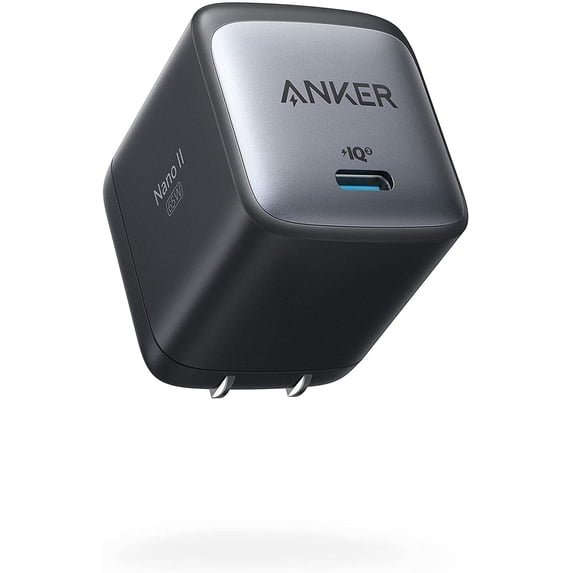
The strongest reason to buy a single-port charger is a routine that only needs one output. Perhaps your laptop charges at your desk and your phone charges later. Perhaps you want a spare adapter for a work bag. In those situations, additional sockets may not solve a real problem.
Write down what you actually connect during an ordinary day. If there is never a second cable attached, compare the total purchase cost, plug arrangement and cable you already own. Do not assume a multi-port design provides more useful laptop power simply because it looks more versatile.
The tradeoff appears when two depleted devices need power at the same time. With the 715, you must charge them in sequence, use another adapter or use a separate supported charging arrangement. If that happens frequently, the inconvenience may matter more than a small difference in the adapter price.
A single-port adapter can also make a shared household setup easier to explain: one cable, one device. Still, simplicity does not guarantee compatibility. Verify that the device accepts USB-C charging and supports a suitable input profile. A familiar connector does not establish every feature behind it.
Choose the 735 when shared charging fits your workload
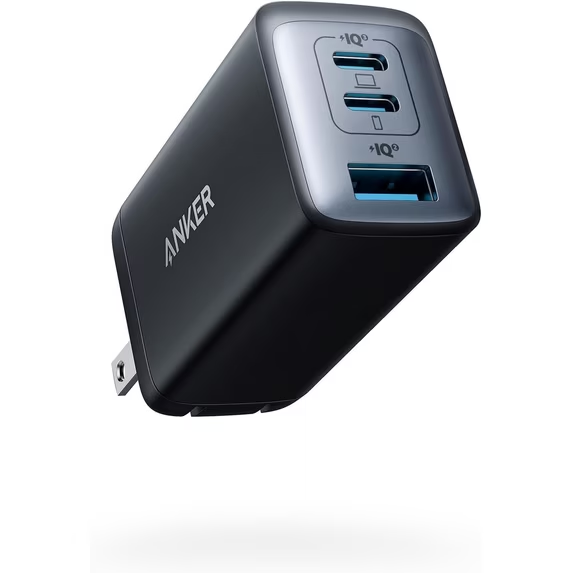
The 735 makes more sense if you regularly arrive with a laptop and phone that both need charging. It can reduce the number of wall adapters you carry. The important question is whether the relevant shared output is enough, rather than whether the adapter has enough holes for your cables.
Put your laptop on the priority USB-C output and check the output chart for the exact combination you intend to use. Read the small port labels on the charger instead of identifying sockets by memory. Leaving the cables connected in a travel pouch may make this routine easier to repeat.
When deciding whether the arrangement is useful, think about deadlines. Overnight charging and a short airport stop are different jobs. A modest shared allowance may be convenient with several hours available, while a quick turnaround can make one-device charging a better choice.
The 735 is therefore a convenience purchase with a power-budget condition. It is not automatically an upgrade for everyone who owns several devices. Owning a laptop, tablet and phone does not mean you charge all three simultaneously, and connecting all three does not guarantee their fastest supported modes.
Understand the 735 power-sharing limits
| A2667 connections | C1 maximum | C2 maximum | USB-A maximum |
|---|---|---|---|
| C1 alone | 65W | — | — |
| C2 alone | — | 65W | — |
| C1 + C2 | 45W | 20W | — |
| C1 + USB-A | 40W | — | 22.5W |
| C2 + USB-A | — | 12W | 12W |
| All three | 40W | 12W | 12W |
Source: Anker A2667 support specifications. These are stated limits for the listed arrangements, not measured device draw. Do not assume unused power from one port automatically transfers to another.
For a hypothetical laptop that works comfortably from a 45W input, the two-USB-C arrangement can be a reasonable starting point. For a workload that requires the full 65W at the laptop, adding the phone changes the result. Compare your laptop maker’s guidance with the relevant row before purchasing.
If the chart does not meet your requirements, compare a stronger adapter’s actual two-port allocation. A bigger total rating alone is insufficient evidence. Our laptop-and-phone charger guide helps frame that comparison, while the 65W vs 100W guide explains the broader power-budget decision.
Laptop compatibility: start with the computer
Find the laptop’s supported charging input and recommended adapter rating. Check the exact model, rather than a broad family name shared by several generations. Also confirm which USB-C socket accepts power, because laptops can have several ports with different capabilities.
Next, separate two goals: keeping the laptop running and replenishing its battery quickly. A charger may support light work while recovering the battery slowly. A heavier workload may leave little power for charging. These are reasons to match the adapter to your real use instead of relying on the charging icon alone.
After buying, observe battery behavior during a representative work session. Start with a known battery percentage, use your normal applications and check it later. This is a practical compatibility check for your own setup, not an independent measurement of the charger’s rated output.
If you use a dock or hub between the adapter and computer, include that device in the compatibility check. Its input and downstream power limits can affect what reaches the laptop. Compare a direct cable connection with the dock’s documented requirements before blaming the wall adapter for a slow charging message.
Phone charging: wattage is only part of the decision
A 65W label does not promise that your phone will draw 65W. The phone’s supported charging mode and the adapter’s compatible profiles determine the available negotiation. Buying a larger number does not override the receiving device’s own input limit.
For Samsung phones in particular, distinguish ordinary fast charging from a specific Super Fast Charging mode. Anker’s A2667 introduction notes that its supported S22 Ultra behavior does not include 45W Super Fast Charging 2.0. Do not extend a generic compatibility list into a maximum-speed promise for every later Galaxy model.
Check the documentation for your exact phone and cable. If maximum Samsung charging speed is your main reason for shopping, use our 45W Samsung charger guide as a separate comparison. A charger chosen primarily for a laptop is not automatically the best fit for every phone protocol.
Choose the cable before comparing the complete cost
Include a suitable cable in your budget if the selected package does not contain one. Read the actual bundle description; images sometimes show devices and cables merely to illustrate a use case. A lower adapter price may be less attractive when you also need another compatible cable.
For pursuing the full 65W USB-C capability, choose an appropriately rated electronically marked 5A cable. A cable advertised for 60W can be a limit. Power rating, data speed and display support are separate specifications, so do not infer them from braided material or a premium-looking connector.
If one lead will also connect your laptop to storage or a display, read those requirements independently. Our e-marked USB-C cable guide explains the identification issue. Avoid paying for display features when you only need a dedicated charging cable, but do not omit them when your workflow depends on them.
Amazon vs Walmart: compare matching offers
We link to both stores so you can compare the selected item and final delivered cost. We have not established a verified current Amazon-and-Walmart price pair for both models. Therefore, this guide does not name a cheapest store or calculate an unsupported saving. Check the buying box and checkout total before ordering.
| Product | Amazon comparison | Walmart comparison |
|---|---|---|
| 715 Nano II A2663 | Check matching 715 offer | Check matching 715 offer |
| 735 Nano II A2667 | Check matching 735 offer | Check matching 735 offer |
| Verified price winner | Not established; confirm current seller, condition, version and delivered total. | |
Begin with the model number, then match the plug type, condition and package quantity. A two-pack, an open-box item and a new single charger are different offers. If the page contains multiple editions, select the correct Nano II variant before comparing a price displayed elsewhere on the page.
Then check seller and fulfillment details. The marketplace name does not necessarily identify the seller handling the order. Read the return terms for the selected offer and confirm whether any advertised coupon applies to your account. A member-only discount should not be treated as a price every reader receives.
Finally, include shipping, tax and necessary cables. Compare the amount you will actually pay for a working kit. If one store is slightly cheaper but delivers after your trip, timing may matter more. These practical differences can decide the purchase even when the product itself is identical.
Three recommendations for common buying situations
One laptop, one cable: shortlist the 715
Choose this route when you charge one device at a time and the laptop supports the adapter’s output. Compare the complete cost with your existing suitable charger first. If your current equipment already solves the problem, there may be no practical reason to replace it.
Laptop plus phone: shortlist the 735
Choose it when the documented shared allocation fits your workload and you want fewer wall adapters. Check the relevant ports before attaching cables. Read our full 735 Nano II review for the model-specific buying discussion.
Demanding laptop plus several devices: compare higher capacity
If the laptop needs its full input while other devices charge, neither option may be the right long-term choice. Compare a higher-output model’s port chart or a desktop charging station. Buy the allocation your devices need rather than the largest advertised total.
Frequently asked questions
Is the Anker 735 faster than the 715?
Not automatically. Both are in the 65W category for a single suitable USB-C device. Device limits, cable capability and the 735’s shared-port configuration determine the useful output.
Can the 715 charge a laptop and phone together?
It has one USB-C output, so you cannot connect two separate charging cables directly to it. Choose a supported multi-port arrangement if simultaneous charging is essential.
Does the 735 supply 65W from both USB-C ports together?
No. Its documented two-USB-C allocation is 45W plus 20W. The single-port maximum should not be multiplied by the number of ports.
Is the 735 Nano II the same as 735 GaNPrime?
No. This comparison concerns Nano II A2667. Use the model number and its own documentation when evaluating another edition.
Which store has the lowest price?
A verified current two-store price pair was not established for both models. Use the links to compare matching offers and the final delivered total.
Have these chargers been tested by MultiChargers?
No. This guide uses published specifications and purchasing analysis. We do not present charging-time, temperature or efficiency measurements.
Final decision
Buy the 715 for a genuine one-device routine. Buy the 735 for simultaneous connections when its shared allocation matches your needs. Choose another power budget if you need more laptop output while charging additional equipment. The right choice is the one that removes a daily charging problem without introducing a new limit.
Before checking out, confirm the model, regional plug, cable requirements and seller. For more detail on the simpler option, read our Anker 715 review. Then compare current offers for the exact package rather than relying on an old deal or a different variant.
Sources and editorial method
Specifications checked October 18, 2026. Primary references: Anker A2663 manual page, Anker 715 model listing, Anker A2667 specifications, and Anker 735 introduction and compatibility notes. Regional product pages identify models; their overseas prices are not used as U.S. offers. Product images are existing retailer illustrations, not photographs from our own testing.