

How Many Watts Does a Laptop Power Bank Need?
How Many Watts Does a Laptop Power Bank Need?
Match the bank’s single USB-C port to your laptop’s charging requirement, then check its energy capacity and multi-port behavior.
A laptop power bank can look powerful on the box yet charge your computer slowly—or fail to charge it at all. The reason is that three different specifications get mixed together: maximum power from one USB-C port, combined power from all ports, and the battery’s stored energy. A 100W headline does not always promise 100W to your laptop while a phone is connected. Likewise, a 100Wh capacity tells you how much energy the bank stores, not its charging speed.
Find your laptop’s actual charging requirement first
Turn over the original charger, inspect its label, or open the manufacturer’s support page for your exact laptop model and year. Write down the advertised wattage and its output voltage/current. A label reading 20V ⎓ 3.25A describes a maximum of 65W. Do not assume every computer within a product family uses the same adapter. An optional fast-charge adapter may have a higher rating than the standard one; some machines can charge at a lower rate than their original adapter when idle.
Next determine whether the USB-C port actually accepts power input. A USB-C shaped port might support data, display output, and charging in different combinations. Some high-performance laptops take USB-C power for light work yet require their original barrel or proprietary adapter to maintain full performance under load. Other computers do not support USB-C input at all. The computer’s manual and support page are more reliable than a generic “works with laptops” claim on a power bank.
If a manufacturer specifies multiple supported adapters, decide whether you need normal charging or its stated fast-charge behavior. Apple, for example, lists different adapters and fast-charge combinations for specific MacBook Air and MacBook Pro generations. Use its model-specific fast-charge guidance rather than treating a particular Mac wattage as a rule for every laptop.
What 30W, 45W, 65W, 100W, and 140W mean in practice
| Single-port output | Useful starting point | What to check |
|---|---|---|
| 30W | Some low-power thin notebooks or charging while off | May be too slow under active use; verify the laptop’s minimum input. |
| 45W | Many light productivity laptops | A laptop with a 65W original adapter may charge more slowly. |
| 65W | Common practical target for a 65W-class laptop | Check 20V output and the simultaneous-port split. |
| 100W | Laptops designed for up to 100W USB-C PD | Use a cable with suitable power rating; 100W total is not necessarily 100W on one port. |
| 140W+ | Specific machines and fast-charge modes that support higher-power USB PD | Confirm EPR support, cable, laptop model, and connector path. |
This is a selection framework, not a list of universal minimums. A 30W bank can sometimes add charge to a machine whose original charger is rated higher when that laptop is asleep; during a demanding workload it can still lose battery percentage. Conversely, choosing a bank rated above the laptop’s requirement does not force excess power into a compatible USB-C PD laptop. Both sides negotiate an available mode. The bank must still advertise the voltage/current combination the laptop needs.
USB-IF explains that USB Power Delivery 3.1 added extended power range levels above the older 100W ceiling. That does not mean any charger labeled “PD 3.1” automatically supplies 140W to any laptop. The bank, the laptop, the particular port, and the cable must all support the appropriate mode. For background, read our USB-C PD 3.1 guide and charger wattage guide.
Per-port output matters more than the headline total
Consider a hypothetical two-port power bank advertised as “100W total.” Its product chart might show 100W from USB-C1 alone, but only 65W from USB-C1 plus 30W from USB-C2 when both are occupied. Another model might advertise 100W total yet cap every individual connector at 65W. These examples illustrate why a large number on the packaging is insufficient. Read the bank’s official one-port and multi-port output tables, then match your laptop to the correct port.
Power sharing can also cause a brief disconnect when another device is plugged in. The bank may renegotiate its output and restart the laptop’s charging session. If the laptop requires more power than its new allocation, it can show a slow-charger warning or draw down its internal battery under load. We cover the related behavior in why multi-port charging briefly stops. For a laptop-first setup, reserve the highest-rated port for the computer and test the exact phone-plus-laptop combination before relying on it away from home.
Does a bigger power bank give a faster charge?
Not automatically. Watt-hours describe stored energy; watts describe delivery rate. A 74Wh bank with a 100W port can offer a faster charging path than a 99Wh bank limited to 45W, assuming the laptop accepts that power. The higher-energy bank may keep the laptop running longer but feed it more slowly. Likewise, 20,000mAh and 27,000mAh marketing labels do not tell you the per-port charging rate.
Battery energy does not all arrive at the laptop. Internal voltage conversion, heat, cable resistance, the computer’s charging circuitry, and bank shutdown thresholds consume part of it. As a rough planning exercise, a hypothetical 74Wh power bank might deliver materially less than 74Wh to the computer. Avoid promising a precise number of laptop charges without a stated efficiency test and the specific laptop battery capacity. For the conversion between mAh and Wh, see our power bank capacity guide.
When comparing products, keep two questions separate. “Will it maintain or refill my laptop while I work?” is primarily a question about compatible output power and the workload. “For how long?” is primarily a question about usable energy, the laptop’s battery and actual consumption. A high-output small bank can be useful for short emergency boosts; a larger bank with insufficient output may disappoint a demanding machine.
The cable and connector can limit the result
For a 65W or 100W setup, read the cable’s marked power rating and the bank’s guidance. USB-IF’s current certification labeling distinguishes 60W and 240W USB-C to USB-C cable capability. A 60W-rated cable should not be assumed to carry a 100W or 140W mode. Select a cable whose certified or documented rating meets the intended power level; for higher-power operation, make sure the complete charging chain supports the required USB PD mode. A cable marketed for fast data transfers is not automatically the right power cable.
A built-in USB-C cable on a bank can be convenient, but its maximum output may differ from the full-size USB-C socket. Inspect the table for that built-in cable specifically. If the laptop uses MagSafe, a proprietary plug, or a barrel connector, confirm a manufacturer-supported USB-C charging route before purchasing adapters. A passive plug conversion cannot create a charging protocol or voltage profile the laptop does not support. Related reading: what an e-marked USB-C cable does.

How to choose a bank for your particular laptop
- Identify the exact laptop. Record model/year and the manufacturer’s input specification, including whether USB-C charging is supported.
- Choose an output target. Start near the original adapter rating for dependable active-use charging. If considering less, check the manufacturer’s minimum and accept a slower result.
- Inspect one-port modes. Confirm that the intended USB-C port offers a compatible PD profile at the target wattage.
- Check simultaneous charging. Read the bank’s output matrix for laptop plus phone, including how power is redistributed.
- Match the cable. Use a suitable power-rated cable or supported integrated cable and the appropriate laptop charging connector.
- Choose capacity. Compare Wh for energy and consider realistic conversion losses, weight, recharge speed, and your travel plans.
- Verify the printed label. Confirm product model number and Wh marking on the exact unit before purchase or flight.
Do not assume that matching the original charger wattage alone guarantees the laptop’s fastest possible charging. The laptop can reduce draw as the battery fills, gets warm, or manages performance. Some fast-charge modes require a specific adapter and cable combination. If the bank’s specifications omit the voltage/current table, ask the manufacturer for it or choose a product with clearer documentation.
Example of a specification-led choice
Suppose your laptop includes a 65W USB-C adapter and accepts USB PD at 20V. You want to charge the laptop and a phone during travel. Look for a bank whose laptop port can supply approximately that power on its own and whose two-port table still allocates enough to that same port while the phone is connected. Compare its Wh capacity with the weight you will carry. A listing that only says “100W combined” without a port breakdown is insufficient evidence.
For a second scenario, suppose a workstation laptop ships with a much higher-power proprietary supply. A 100W USB-C bank may still be useful for topping up while off or light use if the manufacturer supports USB-C input, yet it may not sustain full CPU/GPU performance. Do not promise full-speed gaming or rendering from a USB-C bank unless the laptop maker documents that capability. Some devices deliberately warn about an undersized source.
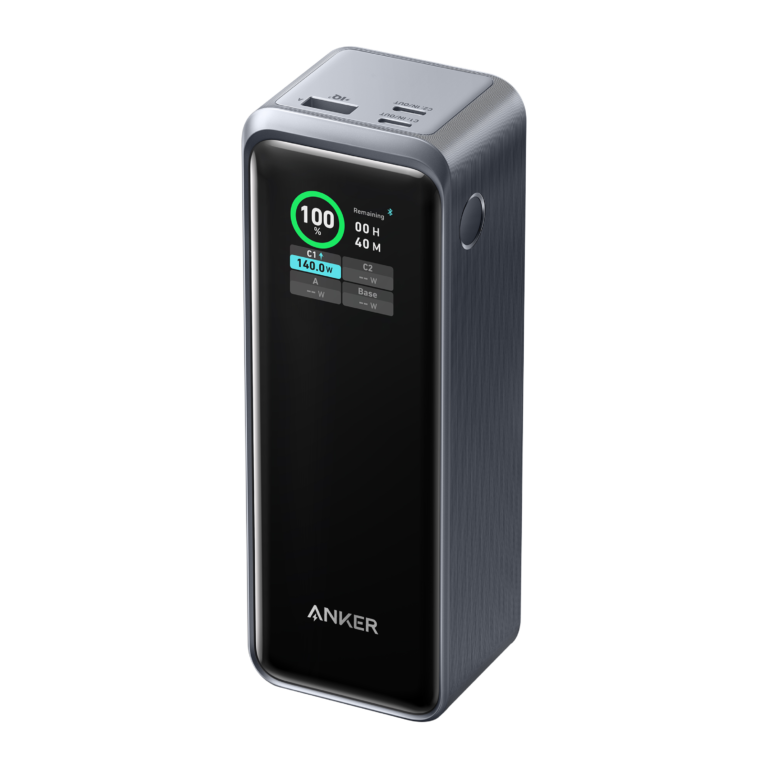
As a real product example for reading the label, Anker’s Prime 27,650mAh model lists 99.54Wh of battery energy and a 250W combined output. These are different dimensions, and its port allocation needs to be checked for a specific laptop. This is a specification example only; we have not measured the product or verified its current price.
Anker Prime 27,650mAh (250W)
Use the manufacturer’s output chart to check one-port and multi-port wattage against your laptop. The 99.54Wh energy figure informs capacity and travel planning; the 250W figure is combined output, not energy storage or guaranteed output from one USB-C connector.
View official specifications ↗Editorial specification example. Confirm the exact model, label, port allocation, availability and airline rules before buying. No hands-on test or price claim.
Can you fly with a laptop power bank?
The FAA treats power banks as spare lithium-ion batteries, so they must travel in carry-on baggage and be removed if your cabin bag is gate-checked. A typical battery of up to 100Wh falls within the ordinary limit. A larger 101–160Wh spare requires airline approval, with no more than two of these larger spares per person under FAA guidance. Above 160Wh is generally prohibited for passenger travel. Airlines, international authorities and flight crews may apply more restrictive conditions, including rules on use during flight. Check your itinerary and carrier before leaving.
Protect the bank from damage and short circuits, and do not bring a swollen or damaged unit. Read the Wh rating on the physical product rather than inferring it from a rounded mAh headline. We cover the specifics in our power bank air-travel guide and the FAA PackSafe guidance. A claim that a product is “airline approved” never replaces checking the particular airline and battery label.
Why a bank might not charge your laptop
If nothing happens when you connect the cable, first confirm the laptop accepts USB-C input on that connector. Next move the cable to the bank’s designated high-power output, press any activation button if required, and try a known suitable power-rated cable. Check the bank’s charge level. Some USB-C ports are input-only; others change their available power when a second device is connected.
If charging appears but the percentage falls during use, the laptop may consume more than the bank provides at that moment. Close a demanding application and compare the result while the laptop sleeps. This can tell you whether the bank provides too little power for active work, though it is not a substitute for checking specifications. Also look for any low-power charger warning from the computer. Avoid repeatedly using a setup that becomes unusually hot or shows erratic disconnects.
If the bank recharges slowly afterward, check its input wattage and the wall adapter. A 100W laptop output rating says nothing by itself about how fast the bank can refill. Also remember that pass-through operation, if supported, can have separate power allocation and temperature limitations. Follow the manufacturer’s instructions rather than assuming the advertised input and output maxima work simultaneously.
Frequently asked questions
Is a 65W power bank enough for a laptop?
It can be for a laptop designed to charge from a 65W USB-C PD source, provided the bank’s chosen port offers a compatible profile and the cable is appropriate. A more demanding machine may charge slowly, only while idle, or not at all. Verify the exact model.
Will a 100W power bank damage a 65W laptop?
A compatible USB-C PD laptop requests a supported power level rather than automatically drawing the source’s maximum. Check that both devices and the cable follow the relevant standards and the manufacturer’s instructions.
Does a 20,000mAh bank always charge a laptop?
No. Capacity alone does not establish USB-C output, voltage support or laptop compatibility. Check its single-port wattage, supported PD profiles and actual Wh.
What is the difference between 100W and 100Wh?
100W is a rate of power delivery; 100Wh is an amount of stored energy. A bank may have either, both, or neither. The flight limit concerns Wh, while the laptop charging match concerns W and voltage/current.
Can I use the power bank while charging my phone?
Often yes, but the bank may split its total output and reduce the laptop port’s allowance. Consult the exact simultaneous-port table and expect a brief renegotiation on some designs.
Do I need a 240W cable for a 140W laptop bank?
Use a cable explicitly rated and supported for the intended higher-power USB-C PD mode. USB-IF’s current certified cable markings include 60W and 240W. The laptop, bank and cable must all support the negotiated mode.
The takeaway
Buy for the laptop’s input specification and the bank’s single-port output first. Then check the shared-port chart, USB PD modes, cable, Wh capacity, recharge input, physical label and travel restrictions. A 65W bank may be enough for a 65W-class USB-C laptop; a higher-demand machine can need more. No marketing wattage replaces the exact model specifications. If a seller does not state the per-port and simultaneous-output figures, there is too little information to make a reliable laptop charging recommendation.
Sources checked September 2026: USB-IF USB Power Delivery, USB-IF cable labeling, Apple fast-charge guidance, FAA PackSafe, and Anker model specification. Illustrative port splits and laptop scenarios are examples, not measured results.




10 Comments