

What Is an E-Marked USB-C Cable? Do You Need One for Fast Charging?
USB-C CABLE GUIDE
A USB-C cable can look identical to another while carrying a very different amount of power. The small electronic marker inside some cables helps a charger and device identify what that cable can support. Here is what that means for everyday charging, and when it matters.
What is an e-marked USB-C cable?
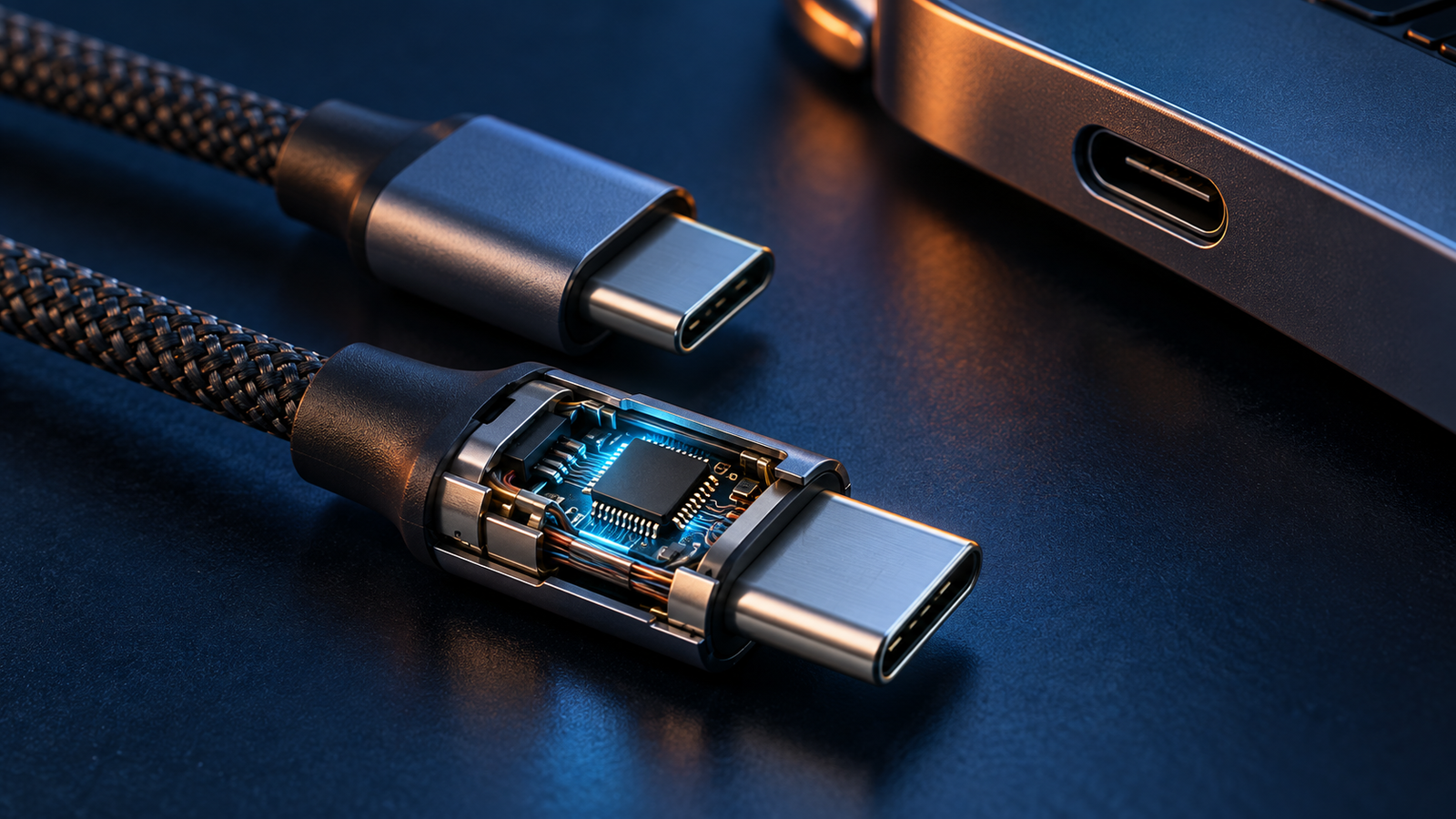
“E-marked” means the cable has an electronically marked cable assembly. Its identification electronics, commonly called an e-marker, can report information such as supported current and cable characteristics through the USB-C connection. The charger and device use this information as part of their capability negotiation. The electronics are normally hidden inside a plug, so appearance alone is not a reliable test.
An e-marker identifies the cable’s declared capability; it does not create extra electrical capacity. The conductors, connectors, construction, and compliance with the relevant cable specification still matter. Nor does it force the attached device to draw a particular wattage. The actual charging level depends on the charger, device, cable and supported power profile together.
How does the e-marker affect fast charging?
With USB Power Delivery, the charger advertises power options and the receiving device requests a compatible one. The cable also has a current rating. When a USB-C to USB-C cable is not identified as capable of more than 3A, a compliant USB PD setup cannot simply assume it may deliver 5A. A suitably rated, electronically marked 5A cable lets the system identify that higher current capability.
That distinction is especially useful at a given voltage: 20V × 3A = 60W, while 20V × 5A = 100W. These are examples of power limits, not promises about what a specific phone or laptop will take. Modern USB PD EPR can use higher voltages to reach up to 240W with a cable built and identified for EPR. See our separate 3A vs 5A USB-C cable comparison for the current-limit decision in more detail.
Do you need an e-marked cable for fast charging?
Sometimes, but not for every fast-charge session. If your phone and charger use a USB PD mode within a 3A cable’s supported current, a compatible 3A USB-C to USB-C cable can fast charge the phone. A high-wattage charger attached to a lower-power phone does not, by itself, make a 5A cable necessary. The phone controls what it requests.
A properly rated e-marked cable matters when your intended USB PD mode requires a current above 3A, such as a compatible 100W-class laptop setup at 20V/5A. For EPR laptops and other devices above the traditional 100W limit, buy a cable explicitly specified for the required EPR power level. Charger and device support must also match.
Some e-marked cables exist for reasons involving data, active cable electronics or other advanced capabilities even if you are not using 5A charging. Conversely, the absence of an obvious chip label on the packaging does not prove a cable is defective. Judge a cable by its published power and data specifications, certification where claimed, and the device’s actual requirements.
E-marked vs non-e-marked: practical comparison
| Question | Typical 3A USB-C cable | Properly rated 5A e-marked USB-C cable |
|---|---|---|
| Maximum current for a standard USB PD cable mode | 3A | 5A, when the charger and device support it |
| Example at 20V | Up to 60W | Up to 100W |
| Suitable for lower-power phone charging? | Usually, with a compatible charger and device | Usually, with a compatible charger and device |
| Enough for USB PD EPR above 100W? | No | Only if the cable is specifically EPR-rated for the required power; a 5A claim by itself is insufficient |
| Does it guarantee high-speed data or video? | No | No |
These are cable-side limits under the relevant USB PD modes. Device input, charger output, negotiated voltage, charge state and temperature can reduce the power actually used. A multi-port charger’s total advertised wattage may also be shared among ports. Our multi-port charger guide explains that distinction.
What do 60W, 100W and 240W labels mean?
USB-IF’s current consumer-facing cable labeling uses 60W and 240W power capability markings for certified USB-C to USB-C cable categories. The 60W marking represents the common 3A class in USB PD Standard Power Range (SPR). The 240W marking identifies the EPR-capable class. You may still see older or vendor-specific “100W” labels for 20V/5A SPR cables in stores; read the actual specification rather than treating every number as an interchangeable certification logo.
A 240W cable is a capability ceiling, not the charge rate of every device attached to it. For example, a phone drawing well below 60W will not suddenly draw 240W. Likewise, the cable’s power marking does not reveal its data transfer rate. A power-focused 240W cable can have basic USB 2.0 data support, while another cable may advertise a faster data standard. If you need an external SSD, dock or monitor, verify data and video capabilities separately.
When should you buy one?
For a phone
Start with the phone’s supported charging protocol and the charger’s matching output. Many phone charging modes work within 3A. A 5A cable is useful when the particular phone, charger and protocol require it, but it is not a universal phone fast-charge upgrade. For Samsung’s higher-power Super Fast Charging modes, the exact model, PPS-capable charger and suitable cable all matter; see our Samsung Super Fast Charging explainer.
For a laptop
Check the laptop’s USB-C charging input and the charger’s per-port output. A laptop needing a USB PD mode above 3A calls for a suitably rated 5A cable. If the laptop calls for EPR power above 100W, select an explicitly EPR-rated cable at or above the required wattage and a matching EPR charger. Buying the cable alone cannot upgrade a charger that lacks that output.
For a multi-port charger
Read both the single-port and simultaneous-use output tables. A charger advertised as “100W total” might allocate substantially less to your laptop when another port is occupied. A 5A cable cannot override that power sharing. If you are unsure which charger rating you need, use our charger wattage guide before selecting the cable.
How to check whether a cable is e-marked
- Read the manufacturer’s exact model specifications. Look for “5A,” a stated 240W EPR rating, and clear cable capability details. Vague “fast charging” language is not enough.
- Look for the appropriate power marking. USB-IF power logos are useful when the product is actually certified and the marking applies to that cable. A printed claim alone is not proof of certification.
- Check a credible product listing or documentation. Confirm the part number, length, current rating and the separate data specification. Longer cables are not automatically equivalent to shorter ones.
- Use a suitable USB-C/USB PD tester if you need diagnostic certainty. A tester that can query cable identity may show electronically reported capabilities, but interpretation depends on the tester and does not replace compliance testing.
Do not cut open a working cable to look for a chip. A photo of an exposed chip is only an illustration of the concept, not a reliable check of the cable you own. If a cable overheats, is visibly damaged, or has loose connectors, stop using it and replace it with an appropriate cable.
Common myths about e-marked USB-C cables
“E-marked means 240W”
No. An e-marker can identify several cable capabilities. Confirm the exact power rating and EPR support rather than assuming the maximum.
“Every fast-charging phone needs 5A”
No. Many phones fast charge within a 3A cable’s limits. Some proprietary or model-specific higher-current modes have additional cable requirements; follow the device maker’s specification.
“240W cable means fast file transfers”
No. Power rating and data speed are separate properties. Check the USB data rate and display support explicitly if they matter to you.
“A higher-rated cable forces too much power into a phone”
No. In a properly functioning compatible USB PD setup, power is negotiated with the device. A cable rated above the phone’s demand merely has capacity available; the charger and device still determine the operating mode. Learn more in our USB PD vs PPS guide.
Buying checklist
- Device: Find its supported charging protocol and maximum input, where the maker publishes them.
- Charger: Check the relevant port’s output profile, including what happens when other ports are used.
- Cable: Match the needed current and power class. Choose a clearly specified 5A cable for above-3A USB PD current, or an EPR-rated cable for EPR charging.
- Data: Verify the actual USB data rate and display capability separately.
- Quality: Prefer a reputable manufacturer and authentic certification claims; avoid damaged or poorly specified cables.
Frequently asked questions
Is an e-marker required for 60W charging?
For a common 20V/3A USB PD arrangement, a suitable 3A USB-C to USB-C cable can carry 60W without needing a 5A e-marker. Other advanced cable features can still lead a manufacturer to include one. The charger and device must support the relevant 60W mode.
Is an e-marker required for 100W charging?
For standard USB PD 20V/5A charging, use a properly rated 5A electronically marked cable so the system can identify the cable’s higher current capability. Also confirm that the charger supplies and the device accepts that mode.
Can I use a 240W cable with a 20W phone charger?
Yes, a compatible USB-C to USB-C 240W cable can be used at lower power. Its higher rating does not force 240W into the phone or make a 20W charger produce more than its supported output.
Will an e-marked cable fix slow charging?
Only if the existing cable’s rating was the actual bottleneck and the charger and device support a higher matching mode. Slow charging can also result from the wrong charger profile, port power sharing, temperature, battery charge level, debris, or a damaged connection.
Do USB-C cable wattage and data speed always match?
No. Choose power, data and display capabilities independently according to your use. Check the exact model’s specification rather than relying on a single “USB-C” or “fast” label.
Bottom line
An e-marker is a way for a USB-C cable to identify its capabilities to the connected equipment. It matters for negotiating higher-current USB PD charging and for certain advanced cables. For a phone charging within 3A, a suitable 3A cable may be all you need. For 5A or EPR charging, match the cable’s explicitly stated rating to the charger and device. The most useful buying question is not simply “Does it have a chip?” but “Does this exact cable support the power and data modes my setup needs?”
Sources and further reading
- USB-IF: Cables and Connectors — cable compliance and current power marking information.
- USB-IF: USB Charger (USB Power Delivery) — USB PD and 240W EPR overview.
- USB-IF: Certified Product Search — checking certified products and cable listings.


19 Comments